
Information Center
Your Health. Your Family. Your Choice.
|
|
National Vaccine Information Center Your Health. Your Family. Your Choice. |
MedAlerts.org |
| Normal Usage: | Expert Mode: |
| Introduction | Introduction |
| Presentations | Presentations |
| Choosing Cases | Choosing Cases |
| Examples | Symptoms |
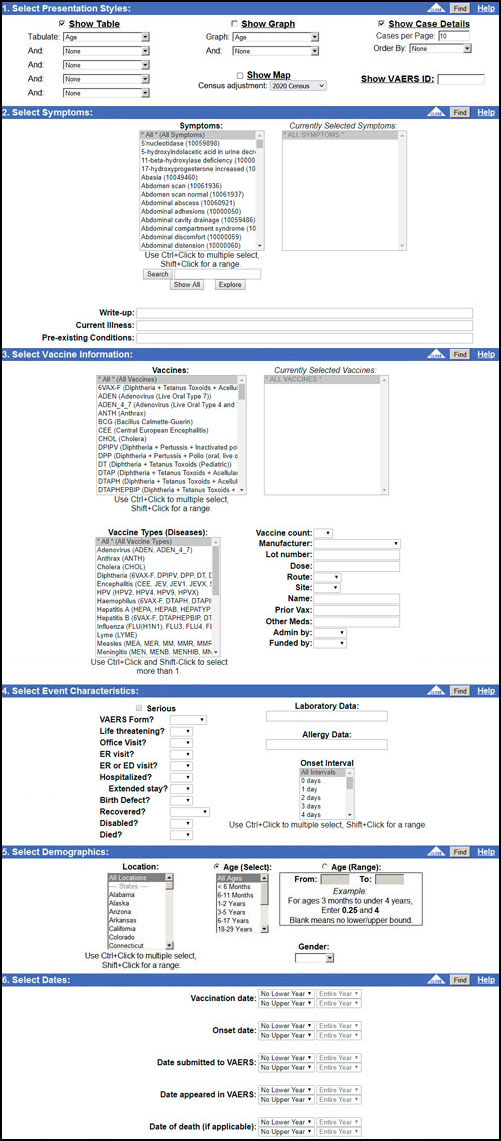
There are two steps to doing a search of VAERS: choose a set of cases, and present the results. The default is to choose all cases in VAERS, and to produce two presentations: a Table by Age and Case Details. To see this default search result, go to the Search Form and click any "Find" button without making any other changes.
VAERS has millions of injury reports, called Cases. Each Case has dozens of fields that describe the injury in different ways. Examples of fields are:
Section 1 of the search form lets you select how the chosen cases will be presented. You can choose tables, graphs, maps, or even the raw Case details.
Sections 2-6 of the search form let you determine which cases will be chosen for presentation and which will be ignored. By default, all of VAERS is chosen, but there are many ways to limit the search.
The Examples page shows some sample searches to give you an idea of the power of the search engine.
Copyright ©
2024 National Vaccine Information Center. All rights reserved.
21525 Ridgetop Circle, Suite 100, Sterling, VA 20166